As .NET powers five million developers worldwide, this post shows how this amazing developer ecosystem can leverage the leading Data & AI platform to build data-driven applications. In this previous post, we explored how to integrate enterprise apps with Databricks using REST APIs and OAuth from Python and Power Apps perspectives. Now, we’re turning the spotlight on .NET.
You’ll learn how to build a .NET 8 Minimal API that authenticates with Databricks SQL via OAuth, both user‑to‑machine and machine‑to‑machine flows, or a simple PAT, then issues REST calls directly against your warehouse.
The sample puts you in full control of token management and query execution. I’ve used this approach with enterprise teams to enable secure, single sign‑on data access in C# services, desktop apps, and microservices. Let’s dive in and see how .NET can tap into your Databricks lakehouse!
Before I forget, all code is available in this repo: https://github.com/eumarassis/DatabricksDotNetSample. Note that the UX code is minimal—written in plan HTML5 with no SPA framework—since the focus is on the OAuth flow.
Deconstructing the App
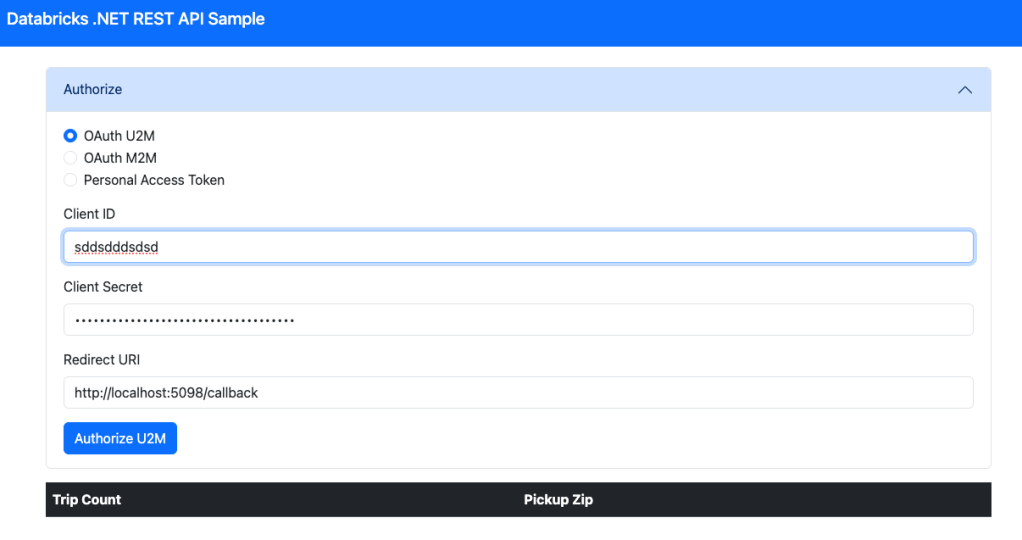
This .NET 8 Minimal Backend API is essentially a lightweight, SDK‑free Databricks client built with standard ASP.NET Core features: it defines a few simple authentication routes to get tokens (/auth), handle callbacks (/callback), and execute queries (/query), all backed by built‑in session state and HttpClientFactory.
At its heart is the DatabricksRepo class, which packages up any SQL statement into a REST POST against your warehouse, then deserializes the JSON response into C# records (like our Trip type). Every time you hit /query, the app transparently checks or refreshes your access token (stored in session), executes the SQL, and returns the results as JSON.
A minimal index.html UI lets you pick your auth mode and launch the flow, but the real focus is the clean separation of routing, session‑based token management, and repository‑driven data access—an architecture you can drop into any .NET web service, desktop app or function to talk to Databricks without ever pulling a SDK.
Show Me The Code
The Databricks Repo Class – querying an Unity Catalog Table using a Databricks SQL endpoint:
public record Trip(long TripCount, string? PickupZip);

class DatabricksRepo
{
    private readonly IHttpClientFactory _httpFactory;
    private readonly string _workspaceUrl, _warehouseId;

    public DatabricksRepo(
        IHttpClientFactory httpFactory,
        string workspaceUrl,
        string warehouseId)
    {
        _httpFactory  = httpFactory;
        _workspaceUrl = workspaceUrl;
        _warehouseId  = warehouseId;
    }

    public async Task<IEnumerable<Trip>> QueryAsync(string accessToken, string statement)
    {
        var client = _httpFactory.CreateClient();
        client.DefaultRequestHeaders.Authorization =
            new AuthenticationHeaderValue("Bearer", accessToken);

        var payload = new { statement, warehouse_id = _warehouseId };
        var resp    = await client.PostAsJsonAsync(
            $"https://{_workspaceUrl}/api/2.0/sql/statements",
            payload);
        resp.EnsureSuccessStatusCode();

        using var doc = await resp.Content.ReadFromJsonAsync<JsonDocument>()
                        ?? throw new Exception("Invalid JSON");

        return doc.RootElement
                    .GetProperty("result")
                    .GetProperty("data_array")
                    .EnumerateArray()
                    .Select(e => new Trip(
                        int.Parse(e[0].GetString() ?? "0"),
                        e[1].GetString()
                    ))
                    .ToList();
    }
}
OAuth Flow – Getting a Service Principal token using Machine-To-Machine (M2M) Flow:
public static async Task<string> GetM2MToken(HttpContext ctx)
{

    var tokenUrl     = $"https://{workspaceUrl}/oidc/v1/token";
    var form = new FormUrlEncodedContent(new[]
                        {
                            new KeyValuePair<string,string>("grant_type",    "client_credentials"),
                            new KeyValuePair<string,string>("scope",    "all-apis"),
                            new KeyValuePair<string,string>("client_id",   cid  ),
                            new KeyValuePair<string,string>("client_secret", csec)
                        });

    var client = ctx.RequestServices
                .GetRequiredService<IHttpClientFactory>()
                .CreateClient();

    var resp = await client.PostAsync(tokenUrl, form);
    resp.EnsureSuccessStatusCode();

    var tk = await resp.Content.ReadFromJsonAsync<TokenResponseInitial>()
                ?? throw new Exception("Failed to parse refresh response.");

    ctx.Session.SetString("auth_access_token",  tk.AccessToken);
    ctx.Session.SetString("auth_expires_at",
        DateTimeOffset.UtcNow
            .AddSeconds(tk.ExpiresIn - 60)
            .ToString("o"));

    return accessToken!;
}
So, what? Let’s Get Building!
I started my career as a .NET developer back in Brazil, and I still get goosebumps every time I see some C# code. My professional success wouldn’t have happened without .NET, and I’m grateful for it. Ten years ago, I made the switch to focus on cloud architecture and data-intensive apps that led me to work with Python and Scala, but I want to ensure Data & AI is truly democratized, regardless of programming skills or platform.
If you’re one of those 5M .NET developers, I can’t wait to see how you’ll plug Databricks’ Data Intelligence Platform into your enterprise .NET apps. Now that you’ve got the blueprint, go build something amazing!
 AI BITS
Leave a comment