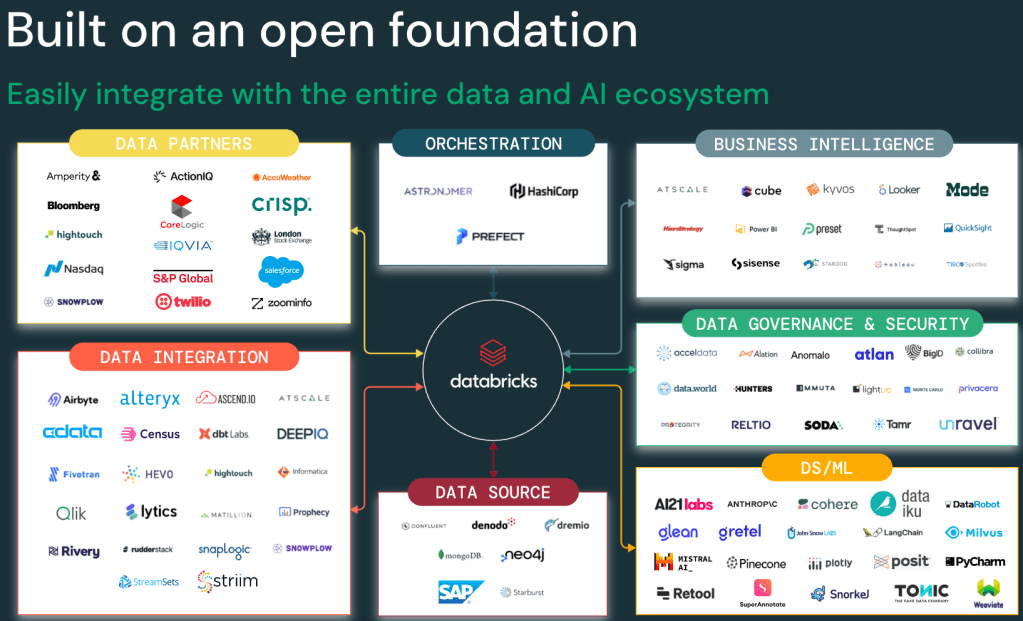
Databricks was founded on the principle of being open from day one. Databricks engineers are the original creators of some of the world’s most popular open-source data technologies and pioneers of the Lakehouse, offering a leading solution available across the three major hyperscalers: AWS, Azure, and GCP. Most importantly, all foundational technologies of Databricks—like Spark, Delta, Delta Sharing, MLflow, and Unity Catalog—are open source. This means customers can invest in the leading Data & AI platform without the fear of vendor lock-in.
Why does being open matter from a business perspective? Being open means no lock-in, no vendor leverage on pricing, and most importantly, it gives engineers the flexibility to work with their tools of choice. It means saving development time, increasing productivity, and avoiding the need to redesign existing processes. In the end, it’s all about saving money!
Still, I’ve heard from several customers asking for examples of how to access data residing in Databricks from external platforms like SageMaker or an Azure Function. This was the perfect excuse I needed to write some Python code. Since “paper accepts anything,” let’s review some concepts and then dive into some examples with Python.
The Options
The table below summarizes the options to access data in Databricks from outside and lists some key considerations.
| What it is | Things to consider | |
| Databricks Connect (link) | Databricks Connect allows you to connect popular IDEs such as Visual Studio Code, PyCharm, RStudio Desktop, IntelliJ IDEA, notebook servers, and other custom applications to Databricks compute. | Requires a compute cluster in Databricks. Works for accessing catalog/tables that are the product of a Delta Share. |
| Delta Sharing (link) | Delta Sharing is the industry’s first open protocol for secure data sharing, making it simple to share data with other organizations regardless of which computing platforms they use. Use when sharing data outside your organization or to a different metastore. | No Databricks compute cluster is required. Unity Catalog in the provider Workspace acts as the Delta Sharing Server. |
| Unity Catalog Open APIs (Preview) | Set of patterns and APIs focused on scenarios where your organization needs to integrate trusted tools or systems to Databricks data, normally inside organization. One of the key capabilities is Credential Vending which grants short-lived credentials using the Unity Catalog REST API. This credential can be used by downstreams libraries like boto3 in AWS or custom apps. | No Databricks compute cluster is required. |
| Databricks SDK (link) or SQL Connector (link) | Databricks provides software development kits (SDKs) that allow you to automate operations in Databricks accounts, workspaces, and related resources using popular programming languages such as Python, Java, and Go. | Requires a compute cluster in Databricks. Works for accessing catalog/tables that are the product of a Delta Share. |
Sample Code
Below are some code snippets for using Databricks Connect and Delta Sharing in Python. These examples demonstrate how to seamlessly integrate Databricks with external tools and platforms. The complete Python code is here.
Databricks Connect
%pip install databricks-connect

from databricks.connect import DatabricksSession

#spark = DatabricksSession.builder.profile("./profile.databrickscfg").getOrCreate()

spark = DatabricksSession.builder.remote(
  host       = "",
  token      = "",
  cluster_id = ""
).getOrCreate()


df = spark.read.table("samples.nyctaxi.trips")
df.show(5)
Delta Sharing
%pip install delta_sharing

import os
import delta_sharing

profile_file = "https://raw.githubusercontent.com/delta-io/delta-sharing/main/examples/open-datasets.share"

client = delta_sharing.SharingClient(profile_file)

print(client.list_all_tables())

table_url = profile_file + "#delta_sharing.default.owid-covid-data"

data = delta_sharing.load_as_pandas(table_url, limit=10)

data = delta_sharing.load_as_pandas(table_url)

print(data[data["iso_code"] == "USA"].head(10))
Wrap Up
In summary, to access data in the Lakehouse from outside Databricks, the main options are Databricks Connect, Delta Sharing, Databricks SDK, and the Open Apache Hive Metastore API. My go-to option is Databricks Connect, as it offers simplicity and a seamless developer experience. However, some customers may not choose it as it requires a running compute cluster in Databricks. In those scenarios, Delta Sharing would be my second choice, even though I’m biased toward using compute in Databricks because I strongly believe the platform offers the best price vs. performance out there.


 AI BITS
Leave a comment